
Turbo Chart Linear Project Software
Advanced Data Visualization and Reporting for Oracle Primavera P6 Users
Turbo Chart – The Fastest Way to Create Time Location Charts for Linear and Vertical Projects

Turbo Chart is the simplest and most affordable way to create Time Location Charts for linear infrastructure and vertical building projects. Designed for construction project managers, planners, and schedulers, Turbo Chart integrates seamlessly with your existing scheduling tools to transform complex schedules into clear, visual time–distance diagrams. With Turbo Chart, you can easily track progress, identify conflicts, and make informed decisions — all from a single, easy-to-read chart.
Why Turbo Chart? Traditional CPM schedules and Gantt charts are detailed, but they lack a visual connection between the project plan and the actual construction site. Turbo Chart adds location intelligence to your schedule, creating a third dimension that makes project data more compact, readable, and actionable.
Turbo Chart works with Primavera P6 and MSP, eliminating the need for double data entry. It can also be used for vertical building projects by using the relative levels between floors as location values. With Turbo Chart, managing construction projects has become simpler and more effective.
Key Features
- Fast, Visual Time Location Charts – Quickly convert detailed schedules into clear time–distance diagrams.
- Integrates with Leading Project Scheduling Software – Works directly with:
- Oracle Primavera P6
- Microsoft Project (MSP)
- Asta PowerProject
- Safran Project/Risk
- Any spreadsheet-based schedule data
- No Double Data Entry – Import existing schedules directly, eliminating the need to recreate data.
- Compact & Readable Reports – Replace multi-page Gantt charts with a single visual diagram.
- Conflict Detection – Spot overlapping tasks, location clashes, and sequence issues instantly.
- Flexible for Any Project Type –
- Linear Infrastructure Projects: Roads, railways, pipelines, tunnels, bridges.
- Vertical Building Projects: High-rise construction using floor levels as location values.
What is a Time–Distance (Time Location) Chart?
A Time–Distance Chart (also called Time–Chainage Diagram, Time–Location Chart, March Chart, or Linear Schedule) is a powerful project management visualization tool where:
- The X-axis represents time.
- The Y-axis represents location (distance or floor level).
This format clearly shows which activities happen where and when, making it easy to identify overlaps, delays, and opportunities for optimization.
Sample Chart
Turbo Chart for Linear Projects
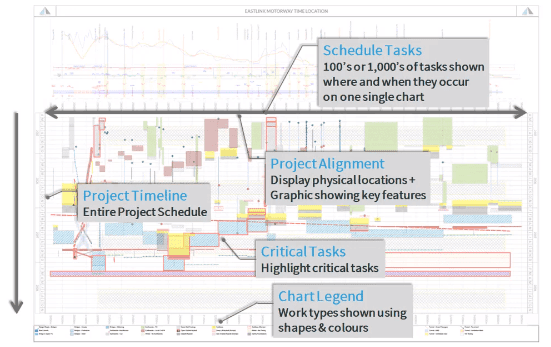
For pipeline, rail, bridge, or road construction projects, Turbo Chart visually presents all activities along the route in one chart. It clearly shows the optimal sequence at each location and simultaneous operations happening elsewhere.
Turbo Chart for Vertical Building Projects
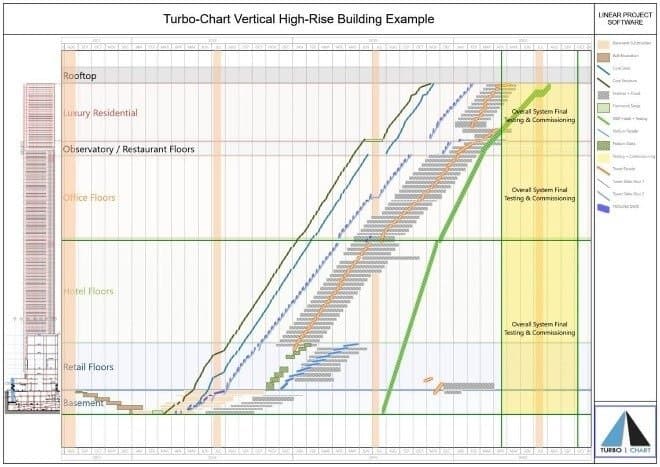
Turbo Chart can also be applied to high-rise building schedules. By using floor levels as location values and adding trade or discipline codes, planners can visualize progress across multiple floors — helping detect trade clashes and improve coordination.
Seamless Primavera P6 Integration
Turbo Chart is fully integrated with Oracle Primavera P6. You can transfer schedule data into Turbo Chart without manual entry, allowing it to serve as an additional reporting tool alongside your Primavera Gantt chart.
Benefits of TurboChart
Empowering planning teams to visualize progress and mitigate risks through industry-leading linear scheduling technology.
Save Time
Generate Time Location Charts in minutes, not hours.
Improve Communication
Present schedules visually for clearer stakeholder understanding.
Enhanced Decision-Making
Spot conflicts and adjust plans quickly.
Support multiple project types
From infrastructure to high-rise buildings.
Turbo Chart transforms complex project schedules into clear, visual, and actionable charts — giving you better control, faster reporting, and smarter project management.